Request checks
Origin and one-time verification
Allowed origins specify which website pages may submit to the form. An origin is a scheme, hostname and port, without the page path. If you allow https://www.example.com:
| Page address | Matches? | Reason |
|---|---|---|
https://www.example.com/contact | Yes | The path is not part of the origin |
https://example.com/contact | No | Different hostname |
http://www.example.com/contact | No | Different scheme |
https://preview.example.com | No | Add the preview hostname separately |
http://localhost:3000 | No | Add the local scheme and port separately |
Request rules
- Allow only the exact configured Origin: scheme, hostname, and port must match. A subdomain or a different port is a separate origin; wildcard matching is not implied.
- FormPostbox keeps only the latest rejected origin and its timestamp for up to 7 days to help the signed-in site owner diagnose mismatches. This diagnostic does not store the rejected message body or IP address. Open the form’s configuration check to compare it with the allowed origins.
- For a protected site, include a valid, single-use Turnstile response in
cf-turnstile-response. A used or missing response is rejected and does not count toward the valid submission limit. Submissions to an unprotected site need no Turnstile response at all. - Include the form’s request intent in
_intent_id. Generate it once when a form instance starts, reuse it for a network retry, and generate a new value only when starting a new message. - Never place the Turnstile secret key in a public page or source bundle.
Where you manage these settings
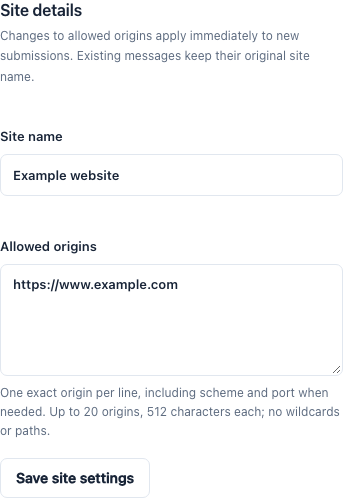
- Allowed origins — Sites → your site → Settings → Allowed origins. One exact origin per line, up to 20; no wildcards and no paths. Changes apply to new submissions immediately. Adding a site reserves one entry; the settings page edits the full list.
- Turnstile widget hostname — set in Cloudflare, inside the widget itself. It is a different value from the allowed origin. The Turnstile setup guide shows the two side by side.
When a submission is rejected because of its origin, the form’s page shows a Recent origin mismatch notice with the exact rejected value. Compare it with the allowed list and fix the difference — usually the scheme, a subdomain, or a port.
Still need help? Contact support@formpostbox.com. Include the guide topic and redacted error details, without keys or visitor messages.
Browse all topics ↑